Twitter Video Downloader
Download X (Twitter) videos and GIFs as MP4 in HD — choose 1080p, 720p or 480p. Fast, free, no watermark, and no login.
Not affiliated with X Corp. By using this tool you agree to our Terms of Service and Privacy Policy.
Download X (Twitter) Videos in 3 Easy Steps
Save any public video from X to your device in seconds:
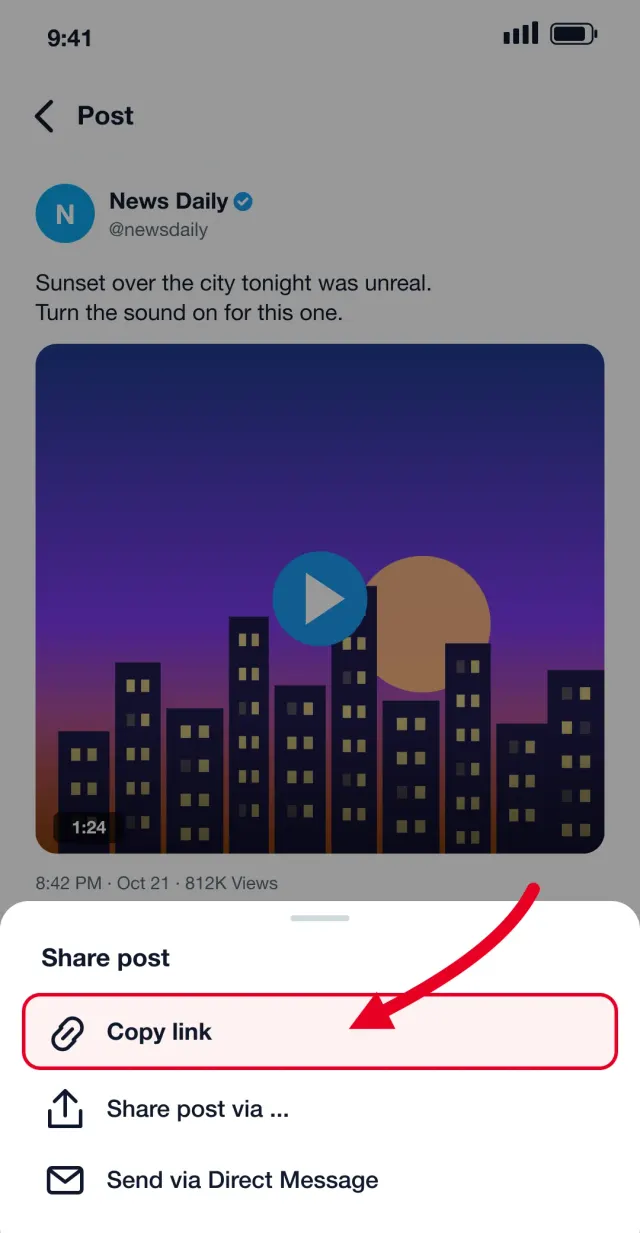
Copy the Tweet Link
Open the post on X, tap the Share icon, and choose "Copy link".
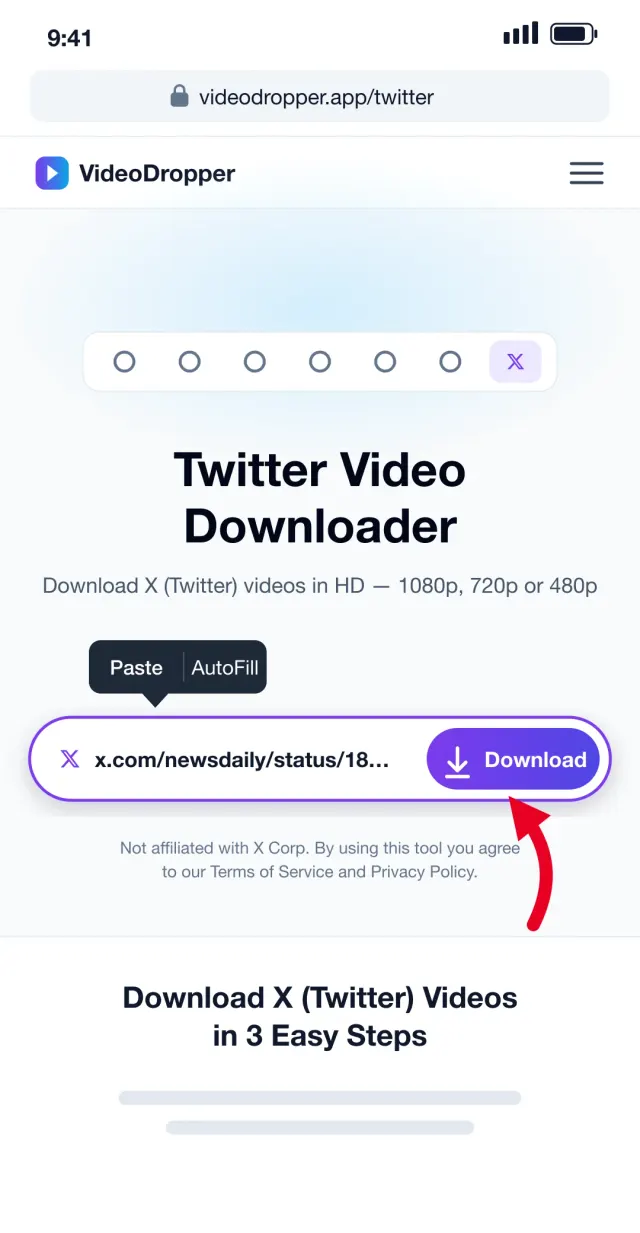
Paste and Fetch
Paste the link into the box above. We find every video, GIF, and image in the post.
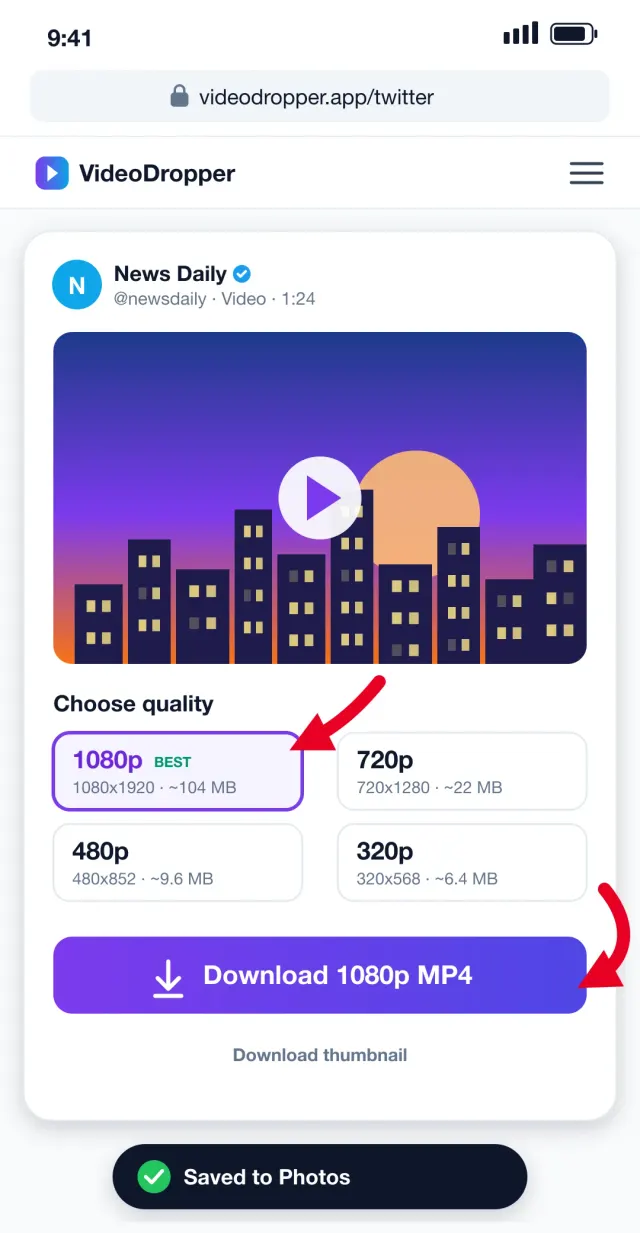
Pick Quality & Save
Choose 1080p, 720p, 480p or smaller, then tap Download to save the MP4.
Save Twitter Videos in the Quality You Want
X doesn't offer a download button for videos. VideoDropper reads the public post and lists every MP4 version available, so you can grab the sharpest copy for editing or a smaller one to save storage and data.
Choose Your Quality
Every resolution X stores is listed, from full HD 1080p down to data-saving 320p, with an estimated file size for each.
Videos, GIFs & Images
Posts with multiple videos or images show each one separately, so you can save exactly what you need.
No Login, No App
Works in any browser on iPhone, Android, Mac, or Windows. You never need an X account or to install anything.
Original MP4 Files
Files come straight from X's servers in their original encoding — no re-compression and no added watermark.
What Is a Twitter Video Downloader?
A Twitter video downloader is an online tool that saves videos from posts on X (formerly Twitter) to your device as regular MP4 files. X lets you watch, like, and repost videos, but it has no button to download them — once a post is deleted or an account goes private, the video is gone.
VideoDropper's X video downloader reads the public post you paste, finds every video, GIF, and image in it, and lists all the MP4 versions X has stored — from full HD 1080p to a light 320p copy. You choose the quality, tap download, and the file is saved straight to your phone or computer, with audio and without a watermark.
It runs entirely in your browser, so there is nothing to install and no X account is needed. It works the same on iPhone, Android, Windows, Mac, and Linux.
How to Download Twitter Videos on iPhone, Android & PC
The steps are almost the same everywhere — here is exactly where to tap and where your video ends up on each device.
Download X (Twitter) videos on iPhone & iPad
- 1 Open the X app or x.com in Safari and find the post with the video.
- 2 Tap the Share icon and choose "Copy link".
- 3 Open videodropper.app/twitter in Safari and tap Paste.
- 4 Pick a quality and tap Download, then tap the download icon in Safari.
- 5 Open the Files app → Downloads, tap the video, and choose "Save Video" to add it to Photos.
Download X (Twitter) videos on Android
- 1 Open the post in the X app and tap the Share icon.
- 2 Choose "Copy link" to copy the tweet URL.
- 3 Open videodropper.app/twitter in Chrome and paste the link.
- 4 Select 1080p, 720p or a smaller quality and tap Download.
- 5 The MP4 is saved to your Downloads folder and shows up in your Gallery.
Download X (Twitter) videos on Windows & Mac
- 1 Open the post on x.com and copy the URL from the address bar.
- 2 Go to videodropper.app/twitter and paste it into the box.
- 3 Choose the resolution you need — 1080p is best for editing.
- 4 Click Download; the MP4 lands in your Downloads folder.
- 5 Play it in any player or import it into Premiere Pro, Final Cut, or CapCut.
Twitter Video Quality: 1080p vs 720p vs 480p
X encodes every uploaded video at several resolutions so it can stream smoothly on any connection. Our downloader shows all of them, so you can trade sharpness for file size. Vertical videos list the short side first (1080 × 1920); landscape videos the long side (1920 × 1080). Sizes below are typical for one minute of video.
| Quality | Resolution | Best for | Size / min |
|---|---|---|---|
| 1080p | 1080 × 1920 / 1920 × 1080 | Editing, big screens, archiving | ~60–80 MB |
| 720p | 720 × 1280 / 1280 × 720 | Phones, sharing on WhatsApp | ~15–20 MB |
| 480p | 480 × 852 / 852 × 480 | Saving storage and data | ~6–8 MB |
| 320p | 320 × 568 / 568 × 320 | Very slow connections | ~4–5 MB |
Not every video has every quality — older or low-resolution uploads may top out at 720p or 480p. The highest available option is always marked "Best".
Download Twitter GIFs as MP4
GIFs on X aren't real GIF files — X converts them to short, silent MP4 videos that loop. That keeps them small and sharp, and it means our Twitter GIF downloader saves them as MP4 too.
MP4 GIFs play and loop in every photo app and messenger. If you need an actual .gif file for a website or slide deck, convert the MP4 with any free GIF converter after downloading.
Is It Safe and Legal to Download X (Twitter) Videos?
VideoDropper never asks for your X login, doesn't install anything, and doesn't keep a copy of the videos you download. Files go straight from X's servers to your device.
Saving a public video to watch offline is generally fine. If you want to re-post, edit, or use someone else's video commercially, get the creator's permission and credit the original account — the video's copyright stays with its owner.
Frequently Asked Questions
Everything you need to know about downloading Twitter / X videos.
How do I download a video from Twitter / X?
Copy the post's link from the Share menu, paste it into the box at the top of this page, choose a quality, and tap Download. The MP4 is saved to your device.
Which video qualities can I download?
We list every MP4 version X provides for the post — typically 1080p, 720p, 480p and 320p. The highest available quality is marked as Best.
Can I download Twitter GIFs?
Yes. X stores GIFs as short MP4 videos, so they download as MP4 files that loop in most players and can be converted to GIF if needed.
Does it work with private or protected accounts?
No. Only posts from public accounts can be downloaded. Protected posts aren't accessible without signing in, and we never ask for your login.
Where are downloaded videos saved?
On iPhone, check the Downloads folder in the Files app (you can then save it to Photos). On Android and desktop, look in your Downloads folder.
Is it free?
Yes, completely free with no limits on how many videos you download.
Do downloaded Twitter videos include sound?
Yes. The MP4 files X serves contain both video and audio, so your download plays with sound exactly like it does on X.
Is there a watermark on downloaded videos?
No. We don't add any watermark or logo — you get the same file X streams, in the quality you choose.
Can I download a video from a post with multiple videos?
Yes. Every video, GIF, and image in the post is listed separately with its own quality options and download button.
Does it work with twitter.com links as well as x.com?
Yes. Links from x.com, twitter.com, and mobile.twitter.com all work, including links copied with tracking parameters like ?s=46.
Why can't I download a certain video?
The post may be from a protected account, deleted, age-restricted, or a live broadcast that has no saved file yet. Double-check the link opens publicly in a private browser window.
Is it legal to download Twitter videos?
Downloading for personal, offline viewing is generally fine. Re-uploading or using someone else's video commercially needs the creator's permission, so always respect copyright and credit the original account.